

Updated September 2026: the ASIN-level blocks from April 2025 never went away. Amazon has since published a help page for them, added an exemption request, confirmed AWD transfers are blocked too, and separately cut account-level capacity limits. The original April 2025 write-up is below, with notes where things changed.
Short answer: Restock limits are product-level blocks that keep an ASIN out of a shipment when Amazon sees excessive inventory. Sellers report roughly 90 days of supply as the line, though Amazon never publishes a number. They differ from account-level capacity limits, which are set in cubic feet. AWD to FBA transfers are blocked too. Check Total days of supply before building a shipment, replenish in smaller batches, and file an ASIN block exemption if the product is seasonal.
Where this stands in September 2026
- Two different limits, two different levels. Capacity limits are account-level, set in cubic feet per storage type each month. Restock blocks are product-level: an ASIN with “excessive inventory” can’t go into a shipment even if your account has plenty of capacity left. (FBA capacity limits, Managing FBA product level shipment restrictions)
- The 90-day line is what sellers hit, not what Amazon publishes. Amazon’s help page says it may restrict “inventory well beyond regular replenishment levels” and never names a number. The roughly 90 days of supply figure comes from Amazon’s own error messages, Seller Support, and what we and other sellers keep running into.
- There is now an exemption request. If a blocked ASIN is seasonal or tied to Prime Day, you can file an ASIN block exemption from the error message in Send to Amazon. Amazon says to allow 24 hours for a decision.
- AWD does not get you around it. Amazon now says it in writing: product restrictions apply to AWD to FBA transfers too.
- Capacity limits got tighter in May 2025. Widely reported as a cut from about 6 months of projected sales to about 5. Amazon’s help page lists the inputs but not the months.
UPDATE: Amazon has responded with more information. Addendum to this article at the end.
Back in 2020/2021, Amazon rapidly released functionality and restrictions around “Restock Limits” and limiting sellers to send in only “Essentials”. Eventually, they loosened up to non-essentials with limits on how many units you can send in. I wrote an article about this in 2021 outlining this. The good news, this eventually was phased out and the floodgates opened. Keep in mind these are not the same as Capacity Limits that are based on the entire selling account, but are specific to certain ASINs on an account.
The bad news: Restock Limits are BACK.
Restock Limits Again?! What is happening?
Amazon had not officially announced new policy or new help pages explaining this when I first wrote this article. The first evidence started popping up around April 8th (Maybe a tad sooner for some) 2025. So what do we know so far?
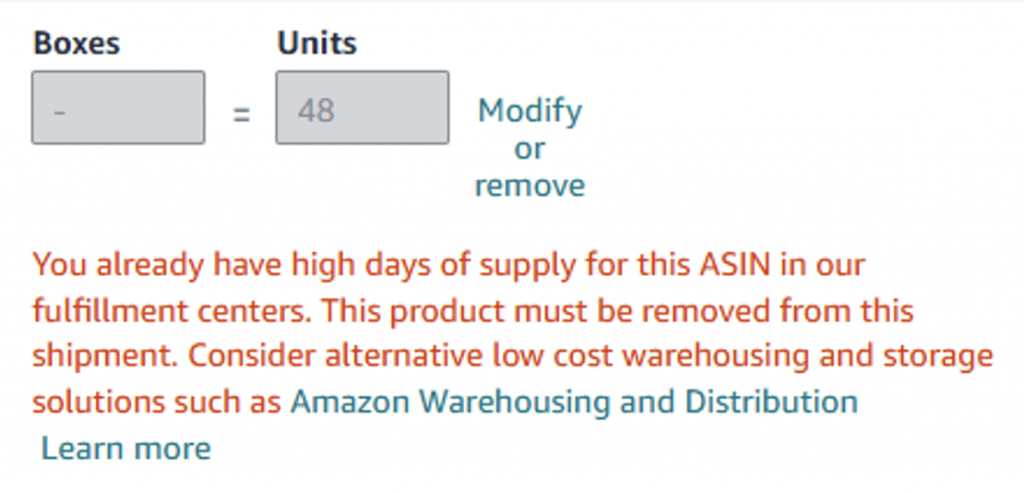
Example of one of the types of errors popping up: “You already have high days of supply for this ASIN in our fulfillment centers. This product must be removed from this shipment. Consider alternative low-cost warehousing and storage solutions such as Amazon Warehousing and Distribution“
Or: “ERROR: This product has a maximum inventory level and exceeds the allowed quantity. View the maximum inventory level on the Restock Inventory page” (Maximum inventory levels are not clearly defined on this page ironically)
Amazon is clearly bracing for impact. Prime Day, Fall Prime Day (October-ish one), Black Friday/Cyber Monday, and of course Christmas. Add in complicated tariff issues and delays at certain cross docks, Amazon is getting laser focused on maximizing their dollar. What this means is they want HIGH turnover. And in a general sense, this makes sense. Amazon does not want to be a storage facility. The problem is, the execution of broad policies on a catalog of 100s of millions of different products/ASINs leads to sweeping mistakes and over/under-correction.
How the Restock Limits Work
What we see is that Amazon does NOT want more than about 90 days of supply at Amazon. Amazon’s own help page never names that number. It says it may restrict products with “inventory well beyond regular replenishment levels” and lifts the block once the product is back to healthy levels. The number you actually need to watch is Total days of supply on the FBA Inventory page, which counts inbound units (Working, In-transit, Receiving) along with what is already in the building (FBA Inventory overview). Easy right? not a big deal. Except, if you have been out of stock on a product for a while, are launching a new product, had a sudden increase in sales (due to promotion or viral events), or a multitude of other scenarios, sometimes 90 days of inventory in a snapshot in time is not actually 90 days of inventory. See example below.
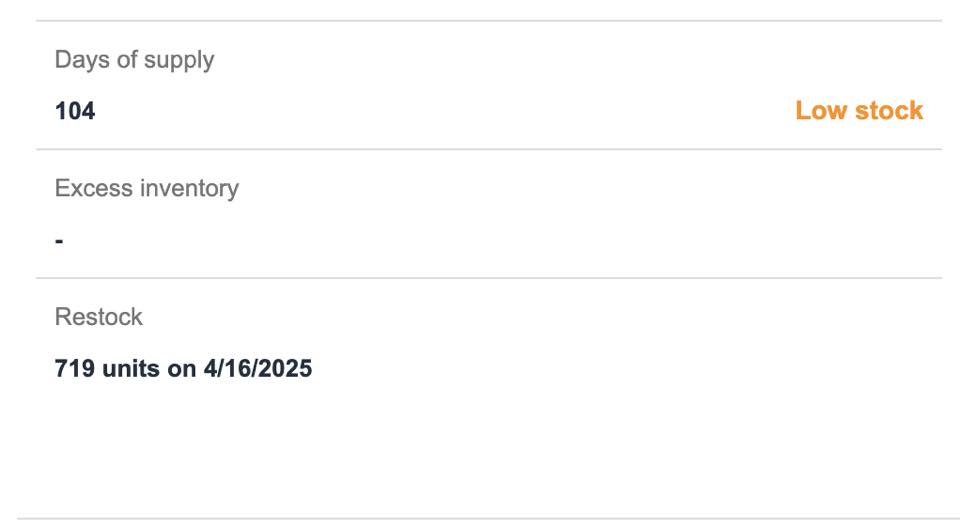
In the image above, this seller “has” 104 days of supply at Amazon. But this is actually false because the “Days of Supply” function is a lagging indicator while the “Low Stock” flag is a forward-looking indicator. The reason I say “lagging” as this only truly adjusts after orders are fully processed and can take days or even over a week for true “averages” to balance out.
According to Amazon’s Help Page, the “Low Stock” flag show up: “for which the days of supply is less than the lead time. Low stock indicates that replenishment shipments may have to be expedited so that the item doesn’t go out of stock.” This means this “flag” is a Forward-looking Indicator and is a better reflection of future sales in most scenarios.
To add fuel to the fire, Amazon is also recommending to send in 719 units into FBA in 6 days. Currently, zero units can be sent in. And in 6 days, according to “Days of supply” we may still not be able to send any in.
Amazon is not factoring in LEAD times either. Spike in demand? I can’t inject my product into FBA warehouses in 24 hours. You can adjust your supply chain settings in the restock dashboard, but unfortunately those don’t seem to be affecting this new policy. As I wrote in my placement fee article, it can take weeks for product to get fully “settled in” into Amazon Fulfillment Centers (FCs).
Example 1: The Domino Effect*
Say you send in 100 units of Product A. Takes 2 weeks to get fully processed into FCs and it sells out in a week. You cannot restock this product until your Days of Supply metric “recalibrates”.
Now you are out of stock.
Now you can send in roughly ~1285 units (90 days based on 7 day sell through) right? Well yeah, but it is going to take a few MORE weeks of getting inventory into FBA after being out of stock again.
What if the actual sales velocity is around 30 units a day if well stocked? Now you are “actually” sending in only 42 days of inventory, but you may need to restock sooner. Oh no, now you get hit with Low Inventory Fees potentially! And if you ask Amazon what to do when a limit keeps you from restocking a low item, their own low-inventory-level fee FAQ says to reduce your excess inventory elsewhere (Low-inventory-level fee). That answer helps with a capacity limit. It does nothing for an ASIN that is blocked on its own days of supply.
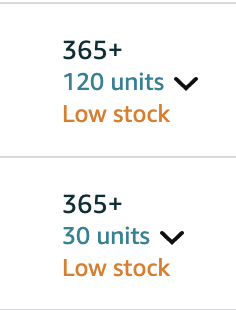
Screenshot showing “over stock” and “low stock” for the same exact product. Completely contradictory metrics.
*The example above is only a “random” sample. It’s not indicative of every situation, but more to highlight potential issues as we all analyze the situation.
Example 2: The Meltable Effect
When I first wrote this, we didn’t know if this would last through the rest of 2025. It did, and it is still here in 2026. Amazon’s recommendation for combating this was this:
“Best Practices for Seasonal Items:
– Send inventory in phases rather than all at once
– Start building inventory 6-8 weeks before your peak season“
1. The first part: Ok, not ideal if you need to ramp up quickly for Christmas rush of meltables, but fine. I’ll take it.
2. The second part? How are we supposed to “ramp up” for meltable season in November when you can’t even send in inventory before the meltable opening date?
The one real tool you have now is the ASIN block exemption with the reason set to Seasonal (more on that below). It does not fix the meltable window itself. Meltables are still their own eligibility rule.
Salt for your Wound
So you see some inefficient parts to the formula. Maybe you can manage some minor fluctuations. You might have a hard time on certain products that haven’t stabilized. But why not add more pain? During COVID, Amazon’s restock limits were SELLER specific. Since April 2025, you are dealing with SELLER AND ASIN limits at the same time.
Seller Restrictions (Capacity Limits)
The seller-level limit is your FBA capacity limit, and it is not a days-of-supply number. It is a volume in cubic feet, one per storage type (standard-size, oversize, apparel, footwear, extra-large), set monthly and usually announced in the fourth week of the month. Amazon says it is influenced by your IPI score, historical sales, seasonality, forecasts, new selection, scheduled deals, fulfillment center capacity, and shipment lead time. Everything on hand plus everything inbound counts against it. New professional accounts active in FBA for less than 39 weeks don’t get capacity limits at all (FBA capacity limits).
In May 2025 a lot of sellers saw their limits cut hard, some by well over half. The widely reported reason is that Amazon shortened the forecast behind the limit from about 6 months of projected sales to about 5. Amazon’s help page does not state the months, so treat that as reported, not published.
Two things on the account side that did not exist when I wrote this. Capacity Manager lets you bid a reservation fee for more space, offset by performance credits on the sales that space generates. And Amazon now runs capacity relief for priority ASINs: low stock or out of stock items, products with upcoming deals, certain holiday-seasonal items, and brand new FBA products for their first 90 days can be sent even when your storage type is at or over its limit. You don’t apply; Amazon flags them. It does not raise your limit (FBA Capacity Relief for Priority ASINs).
ASIN-Level restrictions
ASIN Specific is much scarier for those who are selling on listings with multiple sellers. Here is a direct quote from Amazon’s SAS Core team from April 2025.
“1. ASIN-Level Restrictions:
– The days of supply is typically calculated at the ASIN level across all sellers
– This means that if one seller sends in large quantities of inventory for an ASIN, it can potentially affect other sellers’ ability to send in inventory for that same ASIN
2. Impact of High Inventory:
– Yes, if one seller floods an ASIN with inventory, other sellers might be restricted from sending in additional units
– This is because Amazon looks at the total inventory level for that ASIN across their fulfillment network“
I don’t think I need to annotate more to their statements except for the fact: How in the world can we factor in OTHER SELLER‘s forecasting into our restock quantities?! This means, and apparently already happening, you could be blocked from sending even a single unit in even if you have ZERO stock. Complete blockage from sending skus in means we are left blind to Amazon’s algorithm.
2026 note: SAS Core walked this back a few days later (see Amazon’s Response below), and the current help page talks about restrictions on your products lifting once your products are back to healthy levels. The only mention of other sellers left is the reason Amazon gives: excessive inventory can “limit other sellers from inbounding.” Amazon has still never put a clean yes or no in writing on whether another seller’s stock on a shared ASIN can block yours.
AWD as a backup? Hold up
When this first went up, we had confirmed reports that transferring Amazon Warehousing and Distribution inventory to FBA will NOT exempt you from these limits, but the errors on AWD transfers were inconsistent. That is no longer a guess. Amazon’s help page now says product restrictions apply to all blocked FBA products, “including transfers from Amazon Warehousing and Distribution (AWD),” and that auto-replenishment settings were adjusted to match (Managing FBA product level shipment restrictions).
But here is the fun part. Have a spike in demand? AWD to FBA transfers are not instant. And sellers report AWD’s discounted storage rate wants you to hold roughly 70 days or more of combined AWD plus FBA supply, with at least 70% of that SKU’s FBA replenishment coming through AWD auto-replenishment (AWD help page). Meanwhile the FBA side of that same SKU can get blocked for carrying too much. Good luck balancing that.
Add in the fact that in Q4 2024, Amazon shut off the ability for sellers to send to AWD because they were full. Just more fun variables to keep in mind. We’ve personally seen AWD’s “auto replenish” program be so inaccurate that stockouts happened even for products without volatile sales growth.

Good news… ish.
Amazon has indicated some grace for certain seasonal products through the statements below.
“Seasonal Considerations:
– Amazon’s system takes into account seasonal sales patterns when calculating inventory limits
– However, you may need to plan ahead and communicate with Amazon about upcoming seasonal peaks
– The system might still show “high days of supply” warnings even for seasonal items
What You Can Do:
– Document your item’s seasonality in your case if you need to request a review
– Keep historical sales data to support your seasonal inventory needs
– Plan your shipments strategically to ensure you have adequate stock for peak season while avoiding excessive storage fees.
If you’re experiencing restrictions on seasonal inventory, you may want to contact Seller Support and explain the seasonal nature of your products, as they may be able to make adjustments to accommodate your specific situation.“
Not great, but something to take into consideration for those whom have inventory this would apply to.
2026 update: this is now a real process instead of a Seller Support case. When an ASIN is blocked in Send to Amazon, the error message links to ASIN block exemption. You pick the reason (Seasonal or Prime Day), submit one at a time or in bulk, and Amazon says to give it 24 hours. You can track requests from the Capacity Manager page. If nothing moves after 24 hours, that is when you go to Selling Partner Support (Managing FBA product level shipment restrictions). Our advice: have the seasonality data ready before you need it, because Amazon’s template asks for the reason, and the case is only as good as what you can show.
Full Disclosure: Amazon is Amazon
This information was collected from social media, personal selling accounts of many sellers, communication with Amazon, and many other amazing sellers, agencies, and service providers who contributed to this summary. The only promise I can make is that Amazon is constantly changing. Statements made in this article are based on current data, information, and Amazon’s resources and can change at any time. If this is completely different in a more positive or even negative way, I will do my best to adjust the content for any significant changes. But on the flip side, I highly recommend starting to plan now. Often, Amazon does these changes in a “rollout” method. 100% of sellers don’t get affected at once. But if it works in Amazon’s favor, it is often a indicator to what is to come. I have cited multiple sources where I can in this article.
Now what?
We can all be frustrated or panicking, but in reality, what can we do? Most sellers I speak with focus on two things: Marketing/Growth (Brands) or Sourcing (Wholesale). These are critical for your business! Continue doing these. But please start doing analysis of your inventory, stock levels, turnover, and days of inventory per reorder. These limits have now been in place for over a year, so plan like they are permanent. The sellers who win are the ones who are laser focused on their operations.
In practice that means smaller, more frequent replenishment instead of one big send, keeping a buffer of inventory upstream (with your prep center, your own warehouse, or AWD) so a blocked ASIN is a delay and not a stockout, and checking Total days of supply before you build a shipment instead of finding out at the error.
If you need help, advice, or want to contribute new information on this change of policy, please feel free to reach out!
Amazon’s Response #1:
After this article was initially published, multiple statements have been made by Amazon through different channels. I will be breaking down the issues below.
Help Page Clarity? Not really.
Amazon directly responded to my post in the form of this message:
“Hey, we see a lot of chatter around the FBA product level shipment restrictions. Our FBA team has a help page here with additional information, and it’ll continue to be updated: https://sellercentral.amazon.com/help/hub/reference/external/GYJK3KL7KCFQHGBP. – Ron“
Let’s break it down! Most of this help page is related to Hazmat and other fairly normal inventory issues. Except one:

Amazon confirms “Sending excessive inventory … may … LIMIT OTHER SELLERS from inbounding inventory”. (contextually irrelevant words omitted for clarity).
Additionally, Amazon is referencing and recommending a Minimum Inventory Level help page to help sellers with maximum inventory levels. This makes no sense.
2026 note: Amazon did keep updating that page, as promised. It now covers how long restrictions last (monitored daily, lifted when inventory is healthy again), where to check (FBA Inventory, Total days of supply), the ASIN block exemption, and the AWD transfer rule. It still does not give you a number.
What is “excessive inventory”?
Amazon originally stated 90 days of cover. Well wouldn’t that be nice if it were true! The example below is a product that is currently under that threshold and is STILL being blocked from being sent in.
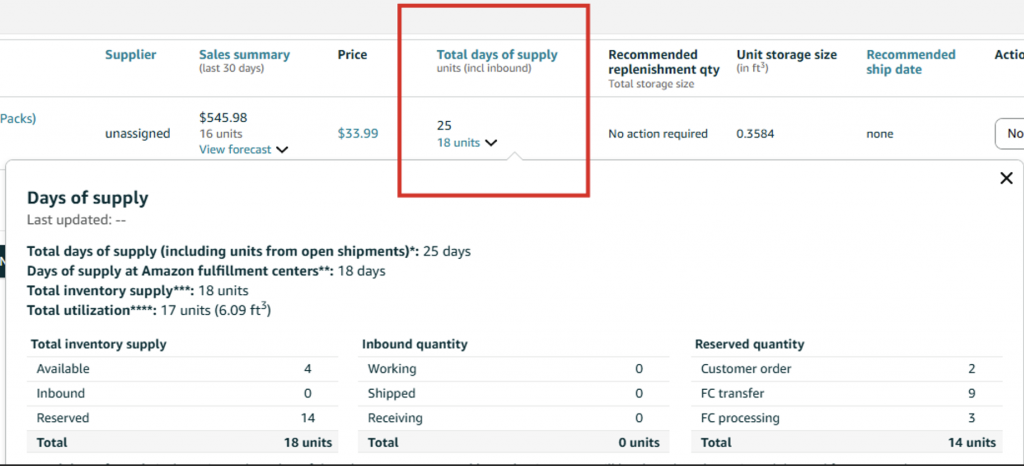
Amazon will likely now indicate this item needs to be charged Low Inventory Fees next week and we STILL can’t send inventory in. So what is it Amazon?
SAS Core: Correction or Contradiction?
Looks like I am on SAS Core’s radar. Time to deconstruct their statements so we truly understand Amazon’s policy.
Statement 1:
“I wanted to follow up regarding your questions about ASIN-level inventory restrictions and provide some important clarifications to the earlier responses you received. You’re seeing this message because Amazon has implemented temporary shipment creation restrictions for certain ASINs to help maintain efficient inventory levels in our fulfillment centers.
For more information, go to Managing FBA product level shipment restrictions.
This help page contains 6 reason codes explaining why a product may be restricted. I recommend reviewing each reason code to understand both the ‘why’ and the recommended actions for each code.“
Ok fair? So they have implemented new restrictions (See Help Page Clarity above) and the various reason codes. Nothing crazy.
Statement 2:
“However, I need to correct some important information about how this works. Days of Supply¹ is the estimated number of days that your current inventory will last based on the forward looking projected demand for your products². It accounts for your inventory in these statuses: Available, Inbound, and Reserved, and Unfulfillable¹. The forward-looking projected demand is estimated based on historical sales and expected customer demand². You can access days of supply metric on FBA inventory page.
Days of Supply Calculation
• It’s calculated for each seller individually
• Only your own inventory units and shipped units are considered in the calculation
• The metric updates weekly
• Your ability to send in inventory is based on your own sales history and inventory levels, not those of other sellers³
To directly address your question: No, if another seller has high inventory levels for an ASIN, it does not affect your ability to send in inventory. Your restrictions are based solely on your own metrics.³“
1. Days of Supply is a slight clerical error. Only Total Days of Supply factors in inbound product which should be the correct term. Currently the algorithm will block ASINs that exclusively have “inbound” more than the 90 days of supply metric, even if that metric hasn’t been re-adjusted to real sales. Amazon is including inbound product into their capacity limitations, which, it’s their platform. Not much can be said about that. Additionally, this metric does not include unfulfillable inventory as per this Help Page. (Still true in 2026: Amazon’s list for Total days of supply is Available, Reserved, Customer Orders, FC-processing, FC-transfer, plus Working, In-transit, and Receiving. No unfulfillable.)
2. “Forward looking projected demand for your products … using Historical and Expected customer demand.” I believe this is in direct reference to my article statements above. First, the metric is a forecasting metric, of course it is forward looking. But that forward looking is only factoring in your data. Which means if you send in 30 units for an item you haven’t sold in a while (even if all 30 sell in 10 days), Amazon is restricting the restocking of this sku until you have greater than 1 week of solid sales data.
These units are all inbound. Amazon knows it is not enough inventory via the Low Stock flag, but the “Days of Inventory” metric is not factoring in “potential future sales”. Forward looking indicator + with a delay + only using data from recent past sales.
These skus have been out of stock for over 90 days due to supply chain issues. If they both start selling very quickly, I potentially will be blocked from restocking in time to stay in stock due to this new policy and then get hit with low inventory fees on the next run.
3. The big contradiction. Dear Amazon: is it based on our sales only or all sellers on an ASIN?! SAS core says one thing. Help pages say another. And evidence says “ASIN level”.
Sellers are complaining about not being able to send in any units on ASINs they have zero stock on.
The Mathematical Solution if Amazon wants it.
Amazon wants better turnover. Sellers want to send in what they need. But the math used is not appropriate. Let’s solve it for them.
1. Use Sales Normalization to determine stock-adjusted sales
Averages of historical data are bad if the data is not contextualized. If a product hasn’t been sold in the past 30 days and the product has been out of stock for the past 30 days, Amazon is treating this as 365+ days of stock. If a product only recently checked in, we are being penalized for the previous days it was not in stock by averaging those “0 sold” days even though no inventory was stocked.
Solution: Amazon should use both Average and Median historical sales while ignoring data with days of “Zero Stock”. Currently they do not ignore Zero Stock days. Zero Stock days should include any day where “Available” = Zero because Inbound, FC Transfer, and other statuses often make the products not buyable.
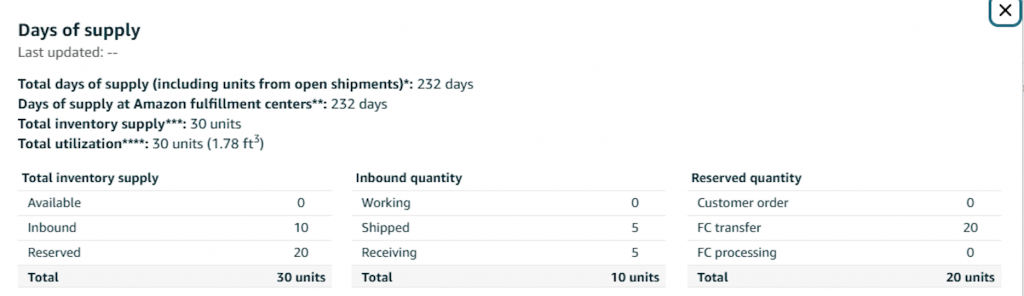
This item sells roughly 13 a day once out of transfer. If Amazon factored in projected demand, why is Days of Supply over 230 days? To avoid low inventory fees, we need to ramp up stock. But we are currently being BLOCKED from doing so because the data is not normalized nor forward “factoring”. Forward looking = predicts the future based on the past. Forward Factoring = adjusts the forecast based on potential future events (more stock).
2. Update Daily with Seller-Only data
Amazon is clearly flip flopping on their position. Allow sellers to forecast for themselves only. It is impossible to forecast against competitors or other sellers. Not to mention the potential abuse that could arise. Also why update weekly? Why do you update shipped quantities, potentially restricting more to be shipped in, instantly, but the rest of the metrics weekly?
Solution: Update all variables the Days of Supply and Total Days of Supply daily. Make a clear statement and remove all contradictions about “ASIN-Level” restrictions. Allow all sellers who have zero stock to send in a non-zero amount of stock.
2026 note: Amazon’s help page now says it monitors inventory levels daily and adjusts restrictions accordingly. Whether the underlying days of supply numbers also refresh daily, it doesn’t say.
3. Bonus: Tell sellers maximum inventory levels and what items are restricted
If you really must stick to existing policy, tell sellers when they can send more inventory in and how much? Currently you have to practically build out shipments then get rejected. Why can a product with 89 days get 10,000 units sent in, but 91 days get potentially blocked from a single unit being sent in? Why does a product with <30 days of supply get blocked from being sent in? Keep the case escalation path open for specific scenarios were stock levels need boosting and seasonality, but realistically, you are restricting sellers without visibility into what they can and can’t send in and how much/when. This data is not visible on the restock report pages.
2026 note: half of this happened. The escalation path exists now (ASIN block exemption). The visibility part did not. There is still no published maximum, and you still find out you are blocked by building the shipment.
My main focus with this article is to educate sellers and provide clarity for policies Amazon is being inconsistent and confusing about. If Amazon wants Seller perspectives, I have many. But expecting sellers to adjust to complex policy changes with lots of guesswork is very challenging.
Sources
- Managing FBA product level shipment restrictions (Amazon Seller Central)
- FBA capacity limits (Amazon Seller Central)
- FBA Capacity Relief for Priority ASINs (Amazon Seller Central)
- FBA Inventory overview (Amazon Seller Central)
- Low-inventory-level fee (Amazon Seller Central)
- Seller Forums thread on zero-stock ASINs being blocked
Comments are closed.