
Updated September 2026: Amazon changed this fee on January 15, 2026. It is now calculated per seller-FNSKU instead of per parent ASIN, it now applies to Small Bulky and Large Bulky products, and Grocery is exempt. The 28-day threshold and the 30-day and 90-day tests did not change. Everything below is updated to match, and I’ve marked what no longer works.
Short answer: Amazon’s low-inventory-level fee is charged on future orders when both your 30-day and 90-day historical days of supply fall below 28 days. Since January 15, 2026, it is calculated per seller-FNSKU instead of per parent ASIN. To avoid it, keep checked-in inventory above 28 days (the article plans to 35 to cover the weekly update) or qualify for an exemption, such as selling fewer than 20 units in 7 days.
Amazon’s introduction of the low inventory fee in 2024 is one of the more unusual fees released in the past few years by Amazon. Why? It is a fee that impacts you as a potential expense but also impacts your cash flow by forcing you to buy, stock, and maintain more inventory. A normal FBA fee is also evenly increased across all sellers. This fee is, however, controllable, albeit difficult. After countless hours of analysis and math (and bringing out the trigonometry and calculus books), I have summarized the ideal number of units to stock distilled into a calculator!
This fee started on April 1st, 2024, and originally applied only to standard-size products. Since January 15, 2026, it applies to standard-size, Small Bulky, and Large Bulky products (Low-inventory-level fee help page).
How is the fee applied?
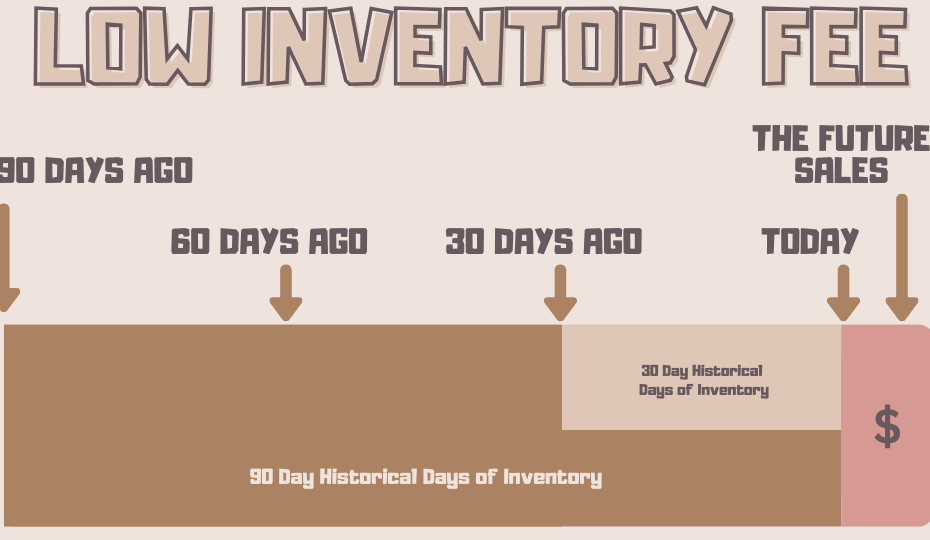
The first misunderstanding I have commonly seen is where and when the fee applies. Your 30-day and 90-day historical days of inventory are the basis as to how this is applied, more on those shortly.
The Low Inventory Fee is, when incurred, applied to future orders (until you stock up again or sell out), based on historical stock levels. Every order After the recalculation will get hit with the fee if that calculation does not pass the 30-Day, 90-Day, and exemption tests. You will be stuck with this fee for 7 days because Amazon updates the metric weekly, not daily, and the latest number sets the fee for units shipped that week. (In our experience the refresh lands Sunday night/Monday morning. Amazon doesn’t publish the day.)
Major Note: The fee never applies retroactively (like traditional storage fees do looking at the past month). It uses historical data to determine if future sales get charged. You also cannot get charged this fee when you don’t have any stock because there are no sales tied to that particular product. And if a product had zero sales over the past 30 or 90 days, Amazon shows a placeholder instead of a historical days of supply number and doesn’t charge the fee.
Major Note #2: Since January 15, 2026, this calculation is done at the seller-FNSKU level. It used to be done at the Parent ASIN level, which is what a lot of older advice (including the first version of this article) is built on. It is also seller-specific: only your own inventory and your own shipped units count, not other sellers on the same listing. More on what the FNSKU change means later.
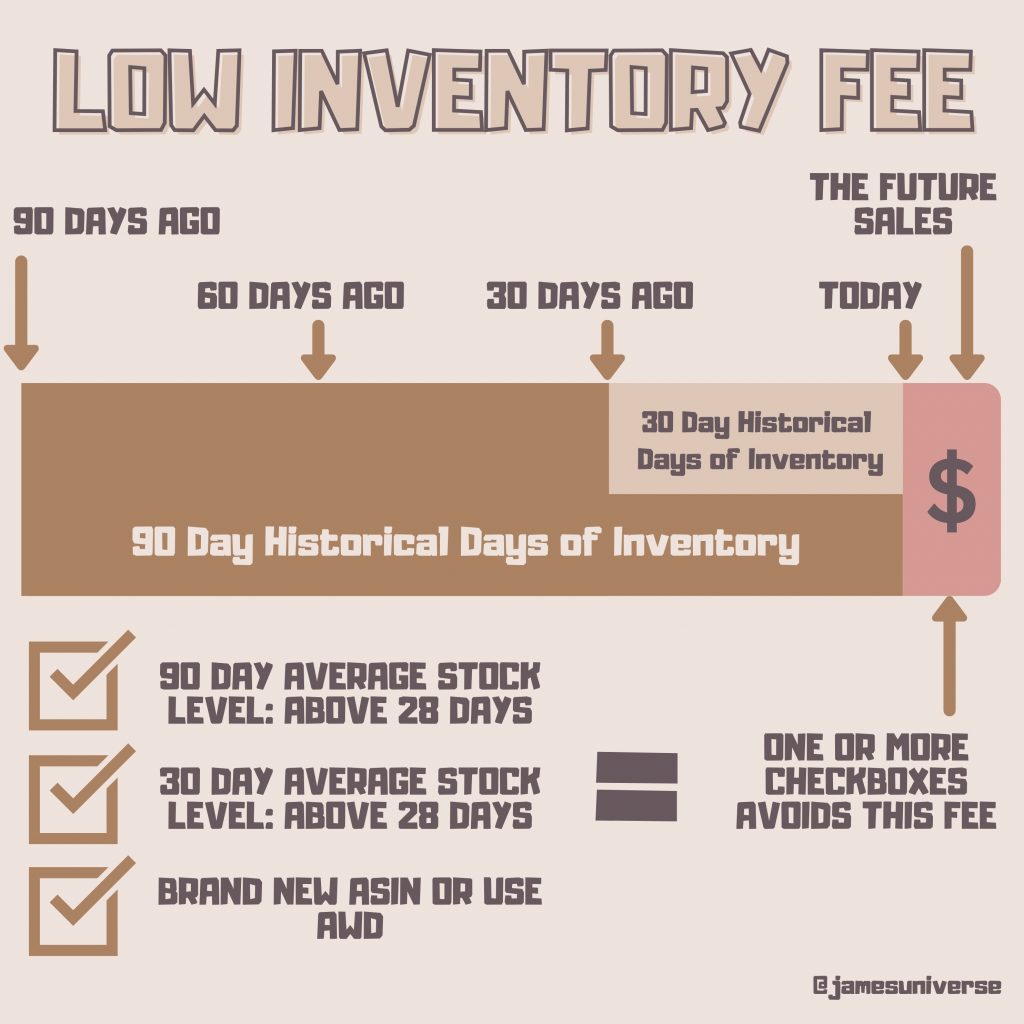
The 3 Tests
Exemptions (New Seller/New Product/AWD and more): The easiest to understand, but not the most applicable for most products. You are exempt if any of these apply:
- New Professional seller: exempt for the first 365 days after your first inventory-received date.
- New-to-FBA parent product: exempt for the first 180 days after its first inventory-received date, but only if it is enrolled in FBA New Selection. It is not automatic.
- AWD auto-replenishment: exempt at the SKU level when 70% or more of that SKU’s inventory was auto-replenished from AWD (Amazon Warehousing and Distribution) over the prior 90 days. You’ll likely be paying more elsewhere due to AWD storage and transfer costs. AWD Analysis to come in a future article.
- Low volume: products that sold fewer than 20 units in the past 7 days.
- Grocery: exempt since January 15, 2026.
30-Day (Historical days of supply) Rule: This is where the math starts to get fun.
1. Every week, Amazon looks back over the past 30 days and calculates your average daily inventory: units Available, in FC Transfer, and in FC Processing. Critical Note: This does not include inbound units or unsellable units, so the inventory must be checked in. (More on this later)
2. Additionally, they calculate your average daily shipped units over the same 30 days. That counts every unit shipped from Amazon’s US network, including Multi-Channel Fulfillment orders, not just Amazon orders.
3. Inventory divided by shipped units is your short-term historical days of supply.
90-Day (Historical days of supply) Rule: The same as above, but over 90 days so it gives some more flexibility for volatile velocity events.
How they combine: You only get charged when both the 30-day and the 90-day numbers are below 28 days. If either one is at 28 or above, no fee. When you are charged, the greater of the two sets which fee tier you land in.
The Data
Amazon provides you with the greater of 30 or 90 Day Historical days of supply metric on the FBA Inventory page of Seller Central, in the Low-inventory-level fee column, with the long-term and short-term numbers available as detail. Be sure to activate this column in preferences if you don’t see it. The search on this page is not very consistent. So you may have to search by ASIN. We have also seen very inconsistent results with the “Minimum [Stock] level” amount told by Amazon; Sometimes Great, but sometimes terrible, so don’t blindly rely on it. To see what you were actually charged per FNSKU, use the SKU Economics report.
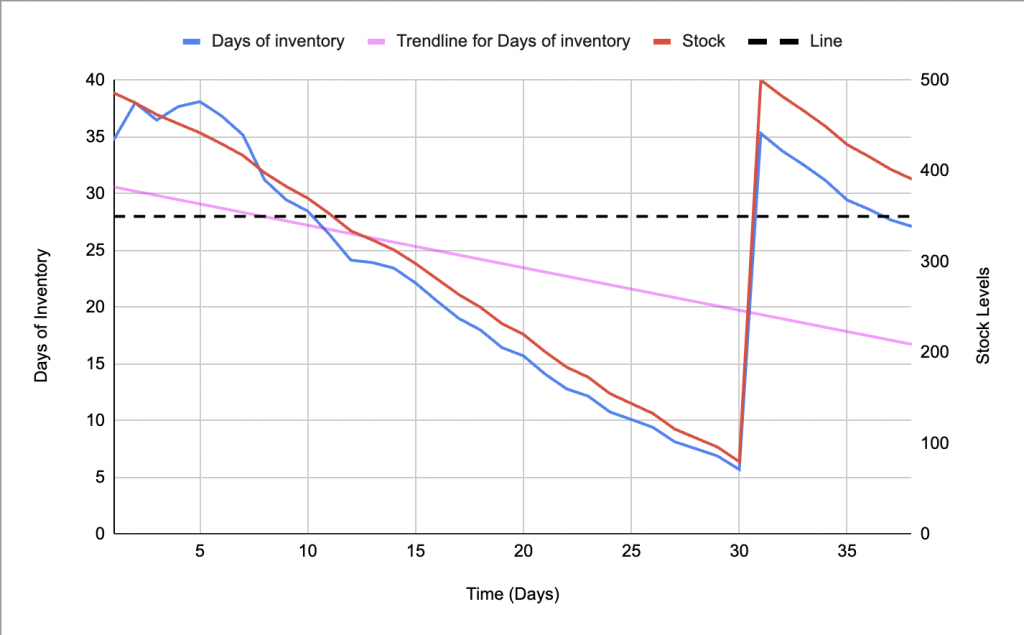
These next charts are approximations as to how a normal restock cycle impacts your likiness to pay the Low Inventory Fee. Treat the Pink Line as an approximation to what a rolling historical days of supply would be like. While your stock (Blue Line) can dip below 28 days of stock temporarily, if the Pink line dips below, you potentially open yourself to the Low Inventory Fees (Factoring in the 90-day average though).
In summary, this means, that if you keep lean inventory like in Example 1 where you have product check-in at the FC (Not just shipped from your facility or picked up by the carrier) at 5 days of inventory remaining, and stock up to about 40 days of inventory, you will be below the 28-day threshold for the Low Inventory Fee (Indicated by the pink trendline).
Example 1: Here you have product check-in (Not ship) at 5 days of inventory remaining (Day 31), and stock up to about 40 days of inventory, you will be below the 28-day threshold (Dashed Line) for the Low Inventory Fee (Indicated by the pink trendline). This means you sent in about 35 days of inventory and have *at Amazon* about 40-45 due to customer orders. This is no longer enough. You could technically stay in stock 100% of the time, yet be incurring massive fees.
Example 2: Here you have product check-in (Not ship) when you reach 31 days of inventory remaining and stock up to about 65 days of inventory, you will be keeping the Historical Days of Stock (Pink Line) above the 28-day threshold for the Low Inventory Fee (Indicated by the pink trendline). This means you restocked in the same amount of inventory, but you hold much more at amazon. Now you need to afford to never dip below that 28-day mark for a sustained period of time.
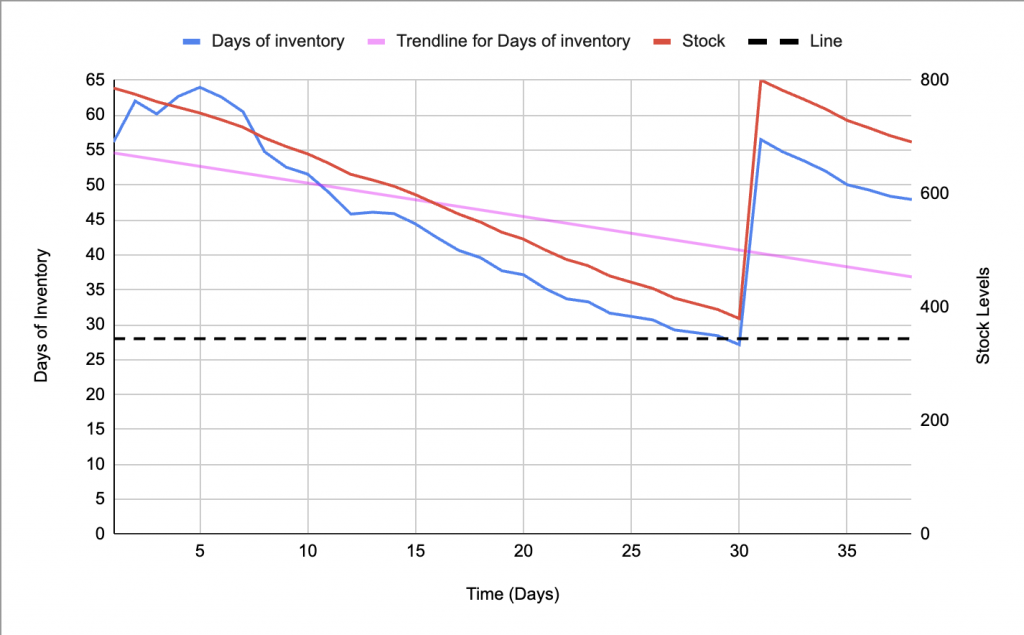
Now yes, the 90-day calculation helps provide a buffer and the above graphs don’t perfectly demonstrate a rolling Historical Days of Stock, but these are intended to just provide broad visuals. This doesn’t mean you can’t dip below 28 days of stock, but you have to be above that threshold a majority of the time.
The 5 Conundrums
- The IPI Score pulls the other way: The IPI Score rewards fast sell-through and dings you for excess inventory. Yet this fee penalizes you for dipping below 4 weeks? Why did Amazon build 2 functions for inventory management that pull in opposite directions? If I knew the answer to “Why Amazon…” I think I’d be in a new business model.
- 7-Day Curveball: Wouldn’t it be handy if this data was provided in real-time‽ Well, of course! That’s why Amazon only calculates this every 7-days. Amazon would never make things easy! So even if you are 1 day off, you have to wait until the next weekly update for the calculations to reset.
- New and Seasonal Products: Wouldn’t this severely hurt sellers with short “sell periods” (Such as Valentines or Graduation)? Or how do you launch a new product when the sell-through is completely unknown? (Partial answer since I wrote this: the under-20-units-a-week exemption covers the slow tail of a season, and New Selection covers launches, if you enroll.)
- Parent ASINs (changed in 2026): When this was calculated at the parent level, your best variation having a production delay could drag the entire parent into the fee. Since January 15, 2026, each FNSKU stands on its own. Good news: one stocked-out variation no longer nails the rest. Bad news: a thin variation can’t hide inside a healthy parent anymore. Every FNSKU has to carry its own weight.
- Stock too little? Pay a fee; Stock too much? Pay a fee: Where is the balance‽ This question is what puzzled me the most and is the basis of writing this article. Running too low gets hit with a per unit fee while running too much gets hit with a per cubic foot fee. This means for every product size, there is a perfect optimal range to stock inventory. Let’s call this “Optimal Inventory Theory”. And since 2025 there is a third side to the squeeze: product-level restock limits can block you from sending more of an item even while it is running low. I wrote that up in Amazon Restock Limits.
Optimal Inventory Theory
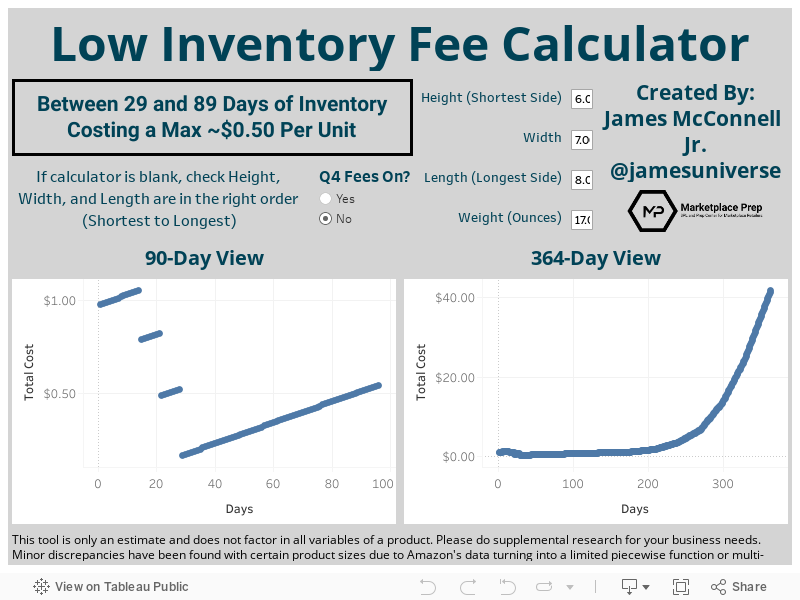
Using the derivative of an exponential graph, we can mathematically approximate for the optimal range and maximum level of stock where you incur the lowest storage fees and still avoid the Low Inventory Fee. But don’t worry. I did the math for you. Now let’s learn how to use it.
Rate note (2026): the charts and calculator below were built on the 2024 fee rates and storage fees. Amazon has changed both since, so treat the specific day ranges as directional. The method still holds: find where storage cost overtakes the fee for your product size. Current rates are on Amazon’s help page.
Of course, the optimal amount of stock is 29 days of inventory and you’d send in exactly one day’s sales of inventory every day. We all know this is both impossible and unrealistic. So let’s dive into that “upper bound”.
Important Note: Everyone has different supply chains. All the information below is based on when inventory checks in, not when it ships or gets made. So you need to add your seller/brand-specific lead times to the numbers.
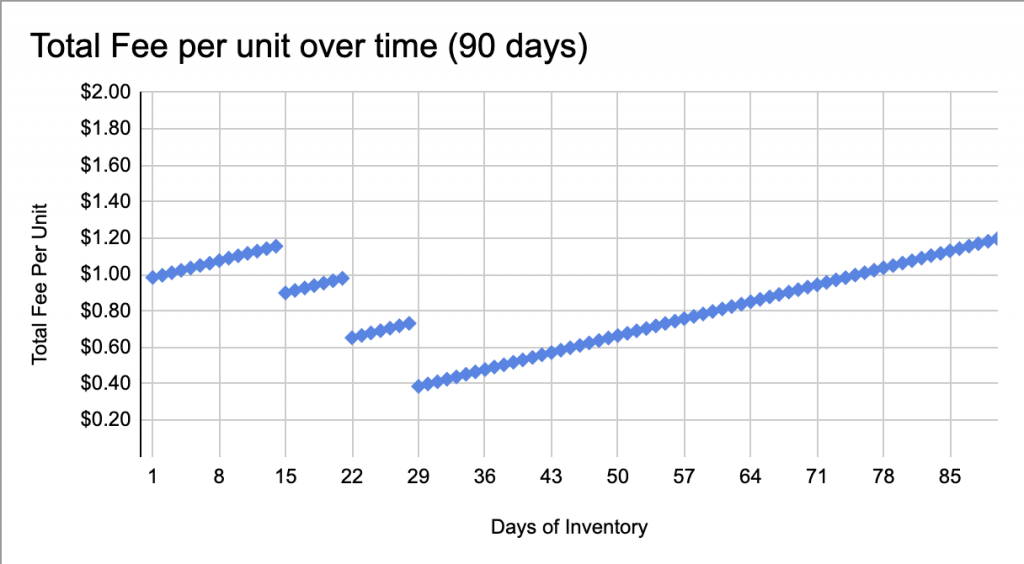
Example 3: It’s hard to see how impactful that low inventory fee hits until plotted. The chart below is for an example product outside of Q4 times. The upper bound in which storage fees exceed the Low Inventory fee is 54 Days. (54 days is approximately the same total-incurred-fee as paying the first Low Inventory Fee tier) So for this product, you’d ideally stay in that range of 29-54 days at Amazon at all times. The reason the chart increases in cost over time is the accrued storage fees add up over time per unit. Our goal is to find the balance between the storage and the Low Inventory Fee.
Example 4: However for a smaller product, you can see you can stock 179 days of inventory and still be cheaper than paying a low inventory fee. (Yes those long-term storage fees are intense too!). This means for some products, it is disproportionally better to overstock than understock. Additionally, you don’t need to stock 179 days of inventory.
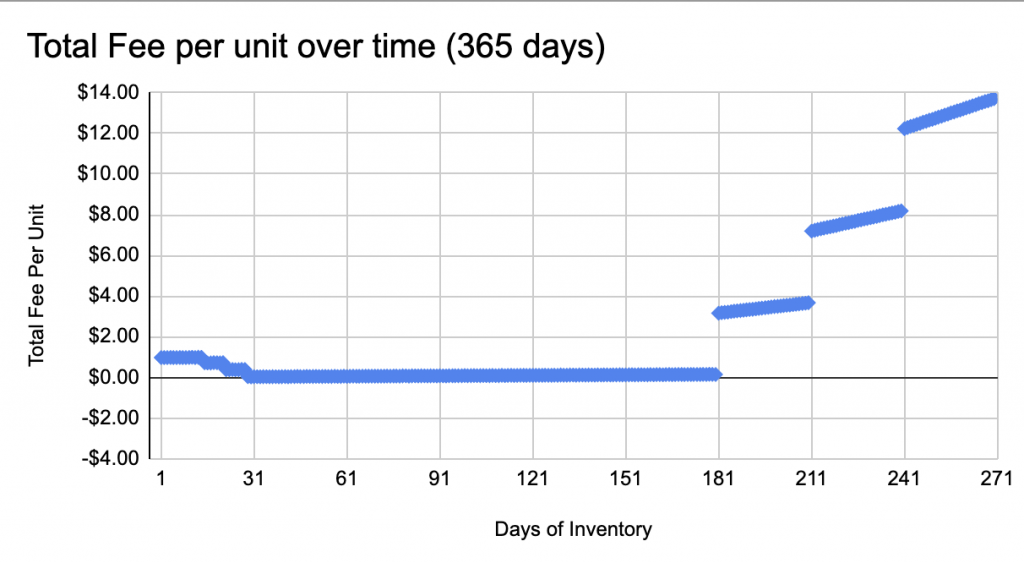
Important Note: If, for a given product size, your “ideal” range is large, then you can potentially save money by stocking less than the maximum stock for that range. But be careful. Smaller ranges have much less room for error.
Q4 Changes Everything!
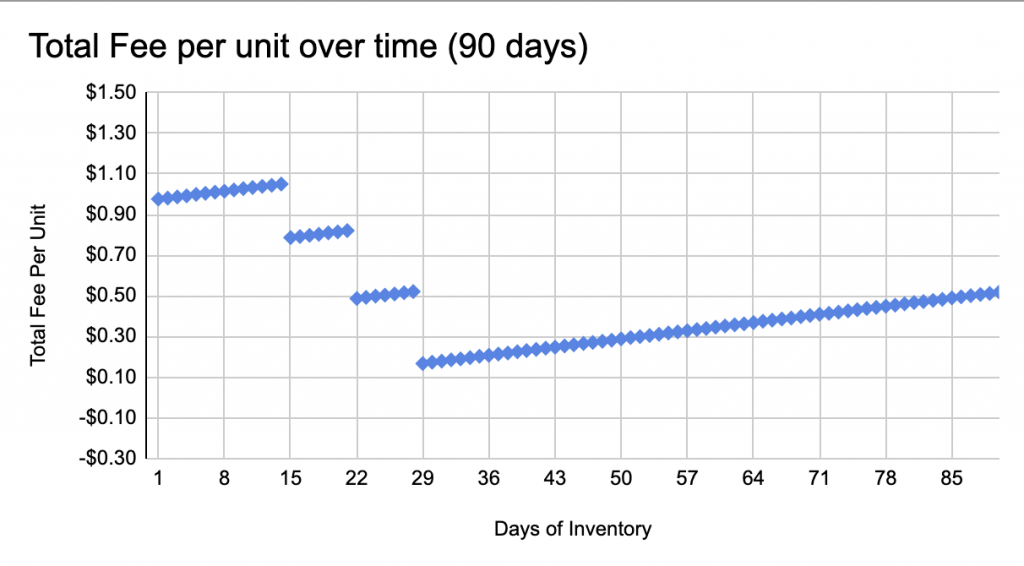
Example 5a: (Before Q4) Lastly, Q4 changes everything. That Q4 storage fee spike can make a product go from an ideal 29-90-day range…
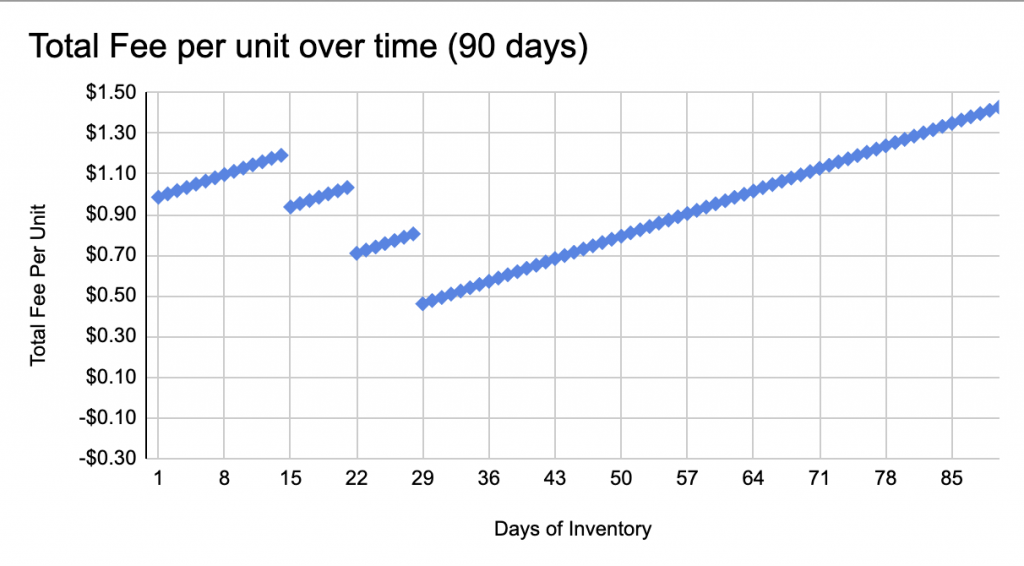
Example 5b: (After Q4) …to a 29-49-day range for the same example product.
Low Inventory Fee: So what is your game plan?
Let’s go back to the 5 conundrums.
- IPI: Probably don’t stock the max days of every SKU as that can be unnecessary for to have 179 days of inventory. However, find that optimal range for your products by stocking as little as you can, never dipping below 35 days of stock. Yes, 35, not 28. Amazon’s threshold is 28; the reason we plan to 35 is #2.
- 7-Day: Amazon is calculating these metrics on a 7-day cycle, not daily. This means if you are off by your estimates, you won’t know until the next weekly update. So plan to add a 7-day buffer to your “28-day minimum”.
- Product Tests + Seasonal: Product testing will likely require shortening your lead times by having stock on hand to ship to Amazon quickly to be able to react to the market. But the cost of testing a SKU might be inclusive of some of this fee moving forward, unless you enroll new products in FBA New Selection to get the 180-day exemption. For Seasonal products, AWD may be an option for some if you let it auto-replenish 70% or more of that SKU; otherwise it will be better to either “price in” the fee or send in stock as early as possible. So if your product size tier allows for an optimal 29-130 days of stock, sending in the product, 120 days before the holiday may be a better move. Additionally, you may want to stay in stock slightly after a holiday, so adjust accordingly. The reason why this works is that you will leverage the 90-day historical calculation to “hold the weight of averages” (Being grossly overstocked early on balances out running out of stock toward the end) even though the 30-day as you run out of stock will be too low. And once weekly sales drop under 20 units, the exemption covers the tail. Check that your product-level restock limits will actually let you send that much in early.
- Parent ASINs: Moving a product in or out of a parentage to change the math no longer works. Since January 15, 2026, the fee is calculated per FNSKU, so parentage doesn’t change anything. Plan stock per FNSKU, and pay the most attention to your slower variations, because they no longer get averaged up by the fast ones.
- Stock Optimal Quantities: Of course optimizing your lead times, analytics for forecasting, and shortening your check-in times at Amazon are always helpful. But for absolutely free you can have access to the Low Inventory Fee calculator I designed! (Built on 2024 rates, see the rate note above.)
One more thing if inbound gets delayed: If Amazon or an Amazon-managed service (Amazon Partnered Carrier, Amazon Global Logistics) causes an excessive inbound delay and you get charged this fee because of it, Amazon says it reimburses the fee automatically, by the 15th of the following month. The catch: the shipment has to be ready for on-time pickup on Amazon-managed transportation, or have accurate tracking if you use your own carrier. That is a prep-side detail worth getting right on every shipment.
I hope this helps you plan around the Low Inventory Fee. In return, all I ask is to please share this with your industry connections. Additionally, if your business is looking for FBA Prep or DTC Fulfillment, please feel free to reach out at the Contact Form Here!
Sources:
- Low Inventory Fee Help Page (rewritten for the January 15, 2026 changes)
- 2026 Updates to US Referral and Fulfillment by Amazon Fees (Amazon announcement)
- Additional Clarification Post by Amazon (2024)
- Post regarding Data Visibility for Sellers
- Storage Fees
- Statistical Analysis and Research Study
Disclaimer: This tool is only an estimate and does not factor in all variables of a product. Please do supplemental research for your business needs. Minor discrepancies have been found with certain product sizes due to Amazon’s data turning into a limited piecewise function or multi-variable calculus.
Comments are closed.