
Short answer: Amazon’s Inventory Performance Index (IPI) is a score from 0 to 1,000, updated weekly, that combines the past three months of excess inventory, sell-through rate, stranded inventory and in-stock rate. It matters because Amazon sets FBA storage capacity limits partly from it; Amazon staff currently say a score of 400 or above helps you keep healthy capacity. The fastest levers are fixing stranded listings and cutting excess units; sell-through takes weeks to move.
Amazon introduced the Inventory Performance Index Score (IPI Score) in 2018 and it has caused all kinds of confusion for sellers. Amazon shows the score on the Seller Central dashboard, but not how each part moves it. This post breaks it down and was updated to match what Amazon currently publishes.
Before we start, your IPI score combines the past three months of sales, inventory levels and costs, and Amazon updates it weekly. So if you have one week of terrible inventory metrics that recovers a week later, you will likely see only a small, temporary dip. On the other hand, if your inventory management keeps getting worse, you will find it hard to raise the score quickly. The score runs from 0 to 1,000.
Secondly, a few eligibility details. In Amazon’s original IPI documentation, scores are for Professional sellers with at least 13 weeks of FBA (Fulfillment by Amazon) history. For capacity limits specifically, Amazon says new Professional accounts (active in FBA for less than 39 weeks) do not receive limits, and accounts past 39 weeks receive limits based on IPI score and sales performance.
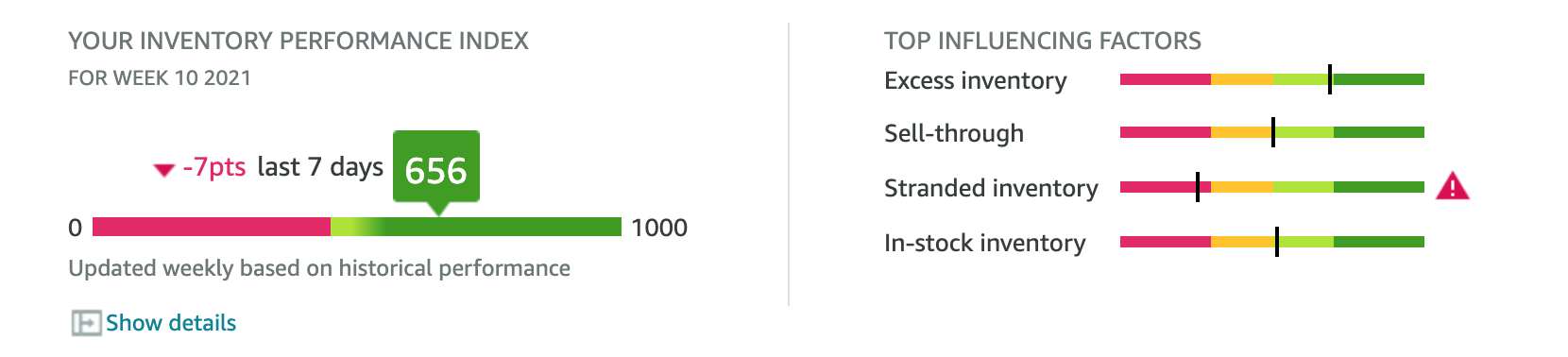
The above image is an example of the Amazon Inventory Performance Dashboard’s IPI Score, from 2021, so your dashboard may look different today. Intuitively you would think that “Oh the IPI score is comprised of 4 simple parts! Let’s increase all 4 for a better score!”. Unfortunately, that is much easier said than done. As history: in Q4 2020, when Amazon’s IPI threshold for storage limits was 500, we saw very large sellers with extremely precise inventory management struggling to stay above it. That puzzled me and started my research.
The 4 Areas of IPI Scores
1. Stranded Inventory
Amazon defines stranded inventory as product in FBA fulfillment centers that does not have an active offer and cannot be sold. It is measured as a percentage of your inventory, and it is based on units, not SKUs. So if you have 100 SKUs down, but only 120 units stranded, you will be affected less than if you have 1,000 units down on 2 SKUs (assuming both have the same total units at FBA). Amazon publishes the exact calculation on a login-only help page.
Stranded inventory typically has some of the lowest impact and easiest ability to fix. In most cases, stranded inventory can be resolved through the “Fix Stranded Inventory” page or by opening a seller support case if the reason is a technical or inventory error.
In my experience, stranded inventory does drop your IPI score, but the proportion it does is minimal.
2. Excess Inventory
Excess Inventory is one of those metrics that causes domino effects on other metrics. Overstocking inventory means more storage, less sell through, more excess inventory, and ultimately higher risk for Amazon.
Illustrative formula (ASIN specific):
Units Available – (Average Units Sold per Day * 90) = Number of Excess Units
Amazon considers items excess when you hold more than 90 days of supply compared with customer demand. The formula above is a simple way to apply that definition at your current sales velocity. Increase sales velocity or decrease stock to reduce your excess inventory units. Amazon also lists aged inventory and long-term storage costs among the things to avoid.
3. Sell-Through Rate
Sell-Through Rate is one of those metrics that people see as “I need to sell more”, but don’t really understand. It measures inventory efficiency, so it is one of the more important ones to focus your time on.
Definition (per Amazon):
Units sold and delivered in the past 90 days / Average number of sellable units in fulfillment centers over that period = Sell-Through Rate
Sell-through is effectively “turnover” of a 90-day period. Because this is an average over 90 days, it is hard to pull this number up in a short period of time. You need to sustain strong sell-through for weeks before it starts averaging in your favor. This means sending in more frequently, dripping inventory into Amazon from your supplier, 3PL, or facility, and maintaining lower inventory levels than you may prefer. It is a careful balance.
4. In-Stock Inventory Rate
This one is special. In Amazon’s IPI documentation, a low FBA in-stock rate is described as not lowering your IPI score, although the metric is listed alongside the other three. Amazon’s current pages list it among the goals, so check your Inventory Performance page for how it is shown on your account. Running out of stock still has indirect costs, such as lost sales and ranking, and it is a signal that your replenishment is off.
Definition (per Amazon): the percentage of time your replenishable FBA products were in stock over the past 30 days, weighted by units sold in the past 60 days.
Formula (ASIN specific):
FBA In-Stock rate = (Days in Stock the past 30 Days) / .3
Formula (Multiple ASINs):
(ASIN 1 60-day units sold * ASIN 1 in-stock rate + ASIN 2 60-day units sold * ASIN 2 in-stock rate) / total 60-day units sold across both ASINs
Example Chart Below:
In this example below, the FBA In-Stock Rate for these two SKUs would be calculated as [(2*50%)+(3*100%)] / (2+3) = 80%

Bonus: Storage Capacity (A Related Cost Factor)
Your IPI is tied to how much FBA space you get. Amazon replaced the old weekly restock limit and quarterly storage limit with a single monthly capacity limit per storage type, measured in cubic feet. Capacity usage includes inventory on hand and open shipments on the way to fulfillment centers. Sellers with consistently higher IPI scores receive higher capacity limits, and the Capacity Manager lets you request additional capacity for a reservation fee you set. Amazon staff currently say that an IPI of 400 or above helps you maintain healthy storage capacity.
Because capacity is measured by volume, physically large goods (oversized private label products) or large quantities of medium and large goods (high-variety shoe sellers) use more of your limit per unit. In my experience they also tend to be the sellers who feel IPI penalties first.
History worth knowing: the IPI threshold for storage limits was 350 until 2019, 400 from January 2020, 500 from August 2020, and 450 from January 2021. Amazon has changed it several times, so confirm the current figure on your dashboard before you plan around any number.
Need a prep partner that handles this for you? Schedule a call or browse our FBA prep guides.
Sources
- Sell on Amazon: What is the FBA Inventory tool? (IPI range, excess, stranded and sell-through definitions)
- Amazon Seller Forums: FBA Inventory Performance Index (IPI), original 2018 post
- Amazon Seller Forums: IPI calculation post
- Amazon Seller Forums: FBA Storage 2026 (IPI of 400 or above)
- Amazon Seller Forums: Refresher on FBA capacity limits and how they work
- Amazon Seller Forums: Capacity limits for new Professional accounts (39 weeks)
- Amazon Seller Forums: Simplified FBA capacity limits
- Amazon Seller Forums: IPI threshold change to 400 (2020)
- Amazon Seller Forums: IPI threshold change to 500 (2020)
- Amazon Seller Forums: IPI threshold change to 450 (2021)
Amazon Seller Central help pages require a seller login.
Comments are closed.